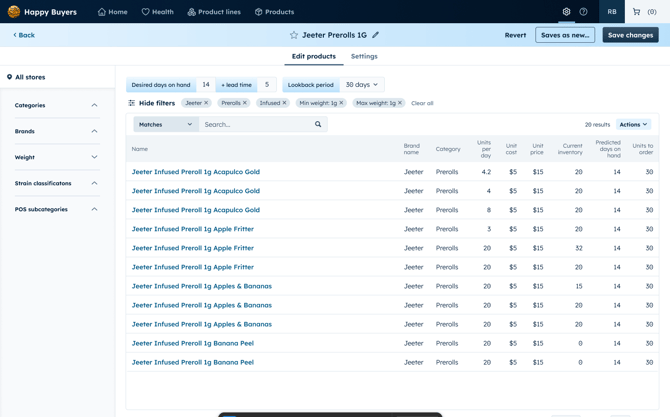
AI Generated Product Lines
When you are onboarded on to Happy Buyers, we generate your product lines using AI. It groups your products by:
- Brand name
- Category
- Weight
- Product subcategory and format (i.e. Live Rosin Carts)
Our team checks over the groupings to make sure they are accurate before they are published to your account.
Creating your own product line
Note: Only org admins can create product lines.
- Navigate to the All products page on Happy Buyers.
- Set your desired days on hand, lead time and lookback period
- Filter down to a brand, category and weight using the left sidebar filters
- ‼️ It's important to use the sidebar filters and not the search bar when possible so we can surface the groups in other places in the app.
- Use other filters or the search bar Match and Does Not Match to further refine the group of products if needed.
- Use minimum price filter to exclude samples
- Use POS Category or Subcategory filters
- Filter out products, like Rosin, by adding a Does Not Match search term.
- Click Create Product line on the top right of your restock report.
- Name your Product line accordingly. For example: [Brand name] 1g Pre-rolls
- Decide what days the report should run - we recommend leaving the default, Mon-Fri, schedule so you have accurate data every day.
-
- Add a case size quantity to round your orders up to the nearest case size.
- Click Create and run. It will take a few minutes before your report is generated.
‘Save as new’ to create a new product line off of existing filters
When editing an existing product line, you can click "Save as new..." to create a new product line directly from the editor.
This is useful if you need to split products into more than one product line.
- Start by filtering down the original group to 1 product line. Rename it correctly, then hit SAVE
- Add and/or remove filters to narrow down to your new product line.
- Click SAVE AS NEW...
- Rename the new group in the pop up modal
- Check Run weekly
- Click Create and Run
- You will then be taken to the new product line page editor where you can make more changes, or click Back to view the original/previous product line.