You can add new products as a custom line item to your purchase order in two ways:
-
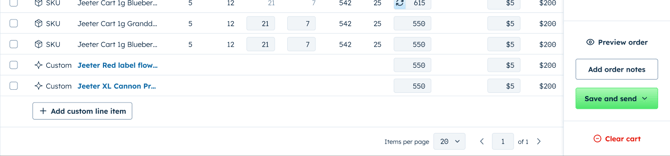
Scroll to the bottom of your order table and click + Add custom line item
-
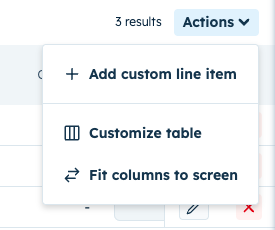
OR click the top right actions dropdown and select + Add custom line item
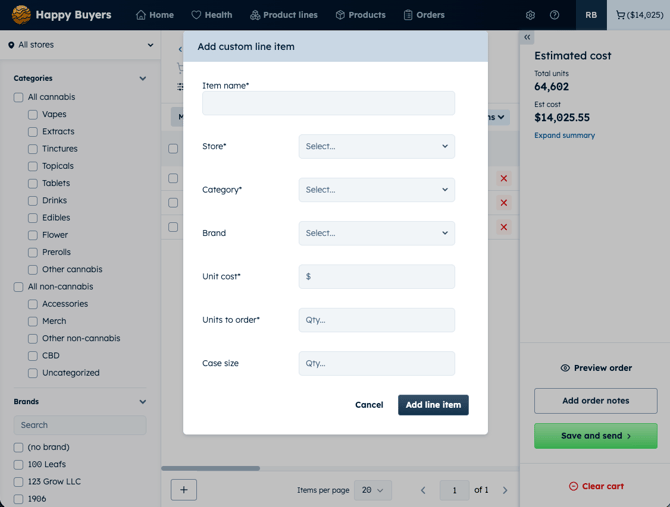
Because a custom line item is for a product with no history in the system, you'll enter the key details yourself:
- Product name — what you'd call it on the order
- Brand — the brand the product belongs to
- Category — so it rolls up correctly in your order preview and totals
- Store(s) — which location (or locations) the line item is for
- Selecting multiple stores will create a separate line item for each store.
- Set a default units to order first, then adjust each store quantity from the main grid after you add the line items.
- Case size — units per case, so quantities round correctly
- Units to order — how many you want
- Unit cost — what you're paying per unit
NOTE: Each custom line item covers a single product at a single store.
If you want to order the same new product for more than one location, add a separate custom line item for each product/store combination