
At the top of the product details panel, you'll see the product's brand, name, store location, and an option to quickly update the carry status of the item. Below this, you will find the product's –
- Run rate & demand forecast
- Sales per day heatmap
- Aging inventory breakdown
- General overview
- Inventory room location(s)
- Package history
Each of these sections contain supplemental details, outlined below.
Run rate
In this section, you have the units sold per day, predicted days on hand, units to reorder, and estimated order cost for the product, with a button to add the product to your cart.
These calculations are based on the days on hand, lead time, and lookback period settings that you currently have set on the Products page.
Sales per day heatmap
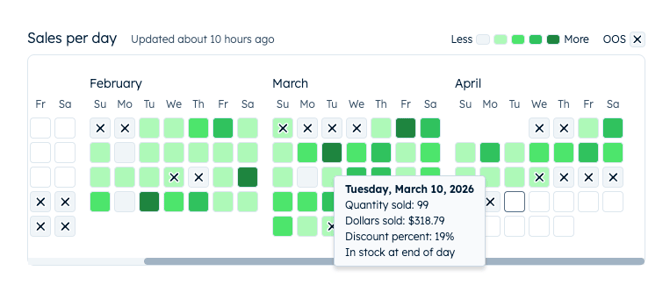
A key differentiator in Happy Buyers is the hyper-accurate run rate calculation from tracking hourly in and out of stock events at the inventory room level. To visualize this, you can access a heat map of which days the product was out of stock at your store overlayed with color coded sales velocity indicators.
The darker the shade of green, the higher the sales velocity. Grey indicates no sales, and X's identify the day(s) this product was out of stock – even if it was just for an hour! Hover over any of the calendar squares for an overview of the product's activity that day, seeing quantity sold, dollars sold, discount percent, and if you ended that day with the product either in or out of stock.
Aging inventory
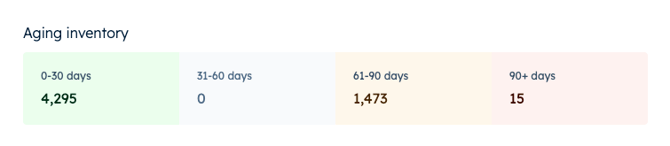
If the product is currently in stock, you will see how many units you have that are 0-30, 31-60, 61-90, and 90+ days aged, based on the package date.
Overview
Included here is the product's –
- Last activity date
- SKU
- Weight
- Category
- Units on hand (sellable and backstock rooms only)
- Unit cost
- Case size – if not already set, you can add it from here
Inventory rooms
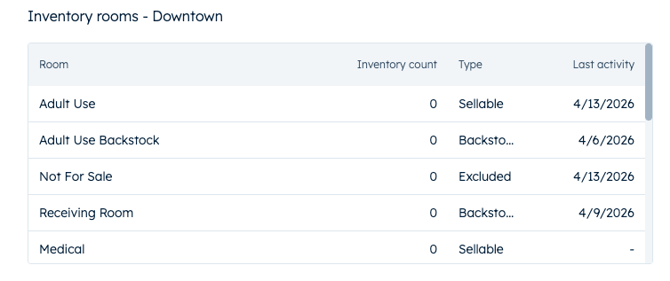
Identify where the product currently is with a breakdown of how many units you have in which inventory room(s). Next to the room type, you'll also find a the last activity date to indicate the last time that product moved in or out of that room.
Packages
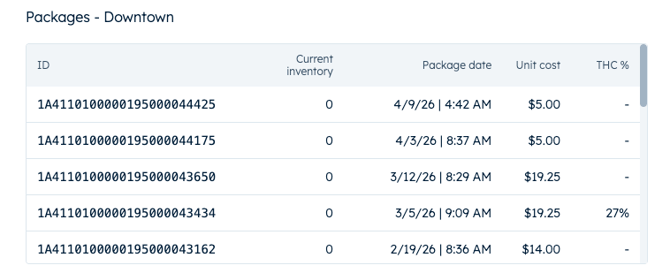
Under packages, you have a detailed history of the packages received for this product over time. Package ID, current inventory per package, package date, unit cost, and the THC % of each package (if applicable) are available here.