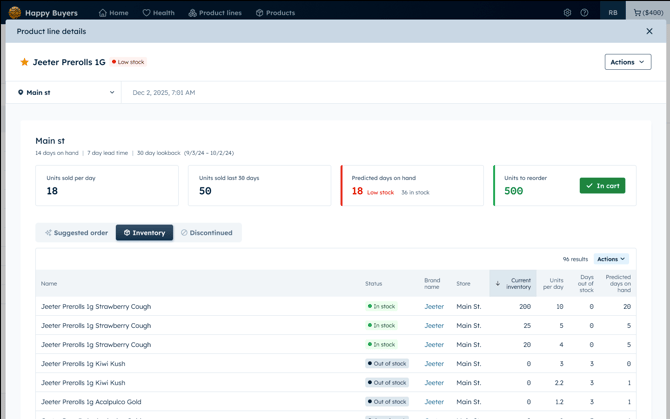
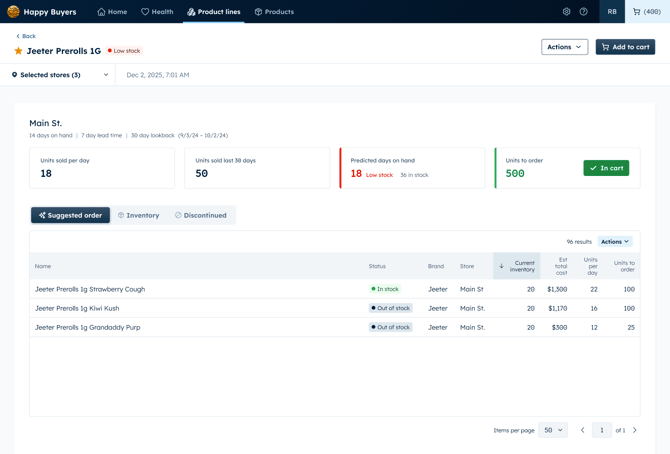
The product line report give is where you can view:
- Sell through data
- Suggested orders
- Inventory
- Discontinued products
- Aging inventory buckets
You can view this information by clicking into each product line OR in by clicking a product line in your cart. Use this information to assist with your ordering decisions.
Suggested orders
Happy Buyers uses AI to generate an automated suggested order based on the most-profitable, low stock SKUs in each product line. The suggested order amounts allocates quantities based off of the total demand of the group.
If you would like to add your suggested order to cart instead of adding the product line to cart, click the blue actions button when inside your product line report and click Add suggested order to cart.
If you prefer adding suggested orders SKUs to your cart, do not also add the product line to your cart as this will double your order quantities.
Inventory
The inventory table is where you can view all of the product line products. You can see which products are currently in stock or out of stock, as well as sell-through data.
Use your inventory data to assist with deciding what new strains to stock depending on menu availability from your vendors.
Discontinue
This is a list of all discontinued product in your product line. Whether you decided to discontinue a strain that sold poorly or an entire product line, this list helps you keep track of items that were not working for your inventory.
Viewing product line details in your cart
Click on a product line name after adding it to your cart to view the product line details.