
When you first get set up on Happy Buyers – be sure to batch update your default product line settings.
Happy Buyers defaults to:
-
14 days on hand
-
3 day lead time
-
30 day lookback period
Navigate to the settings tab when editing a product line to adjust the following:
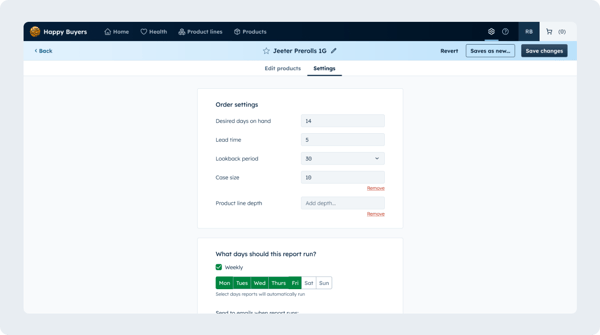
Desired days on hand
How many days of this product do you want to have on hand? The product line will flag as low stock when you are below this quantity.
Lead time
How many days from the time I place this order until the truck will arrive at my store?
Lookback period
How many historical sales days should include to calculate my demand forecast? Happy Buyers allows you to use a 7, 14, 30, 60, and 90 day lookback.
Try to select a sales period that has a meaningful
Product line lookback period use cases:
-
30 days
If these products are regularly in stock, this lookback captures enough data to smooth out day-to-day noise while still reflecting recent demand trends, especially since cannabis is a fast-moving industry. -
60 days
If you order the line irregularly a 60-day window can can capture more sales data while still preventing older, outdated consumer shifts from skewing results. -
90 days
If this was a product you haven't kept in stock recently a 90-day lookback window can help capture enough sales data to provide an accurate forecast.
💡 If you're product line data is all zeros - try extending the lookback period and re-running your product line report!
Case size
Case size quantity will be applied to all product in the product line
Product line depth
What is the desired product variety, or number of flavors and strains, you would like to carry for this product line? Learn more about product line depth.
What days should this report run?
Product line report data runs overnight - Select Mon-Fri to have accurate data on each report daily.
Send emails when report runs
This will send an email with all of the report data each day the report runs. This can be sent to and viewed by any user outside of your organization. NOTE: This can get noisy, so be conscientious of how many emails you send.
IMPORTANT: After you update any product line settings, click the actions dropdown and select Run report to refresh your data!